

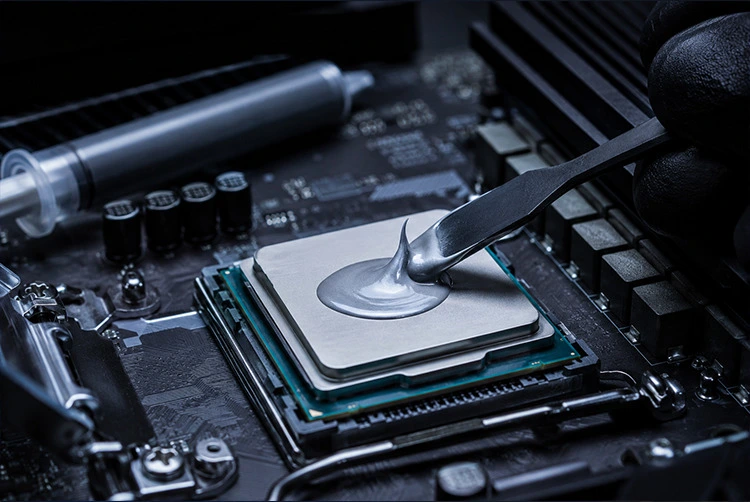
Your CPU cooler cannot do its job without thermal paste working correctly underneath it. That small amount of compound between your processor’s heat spreader and your cooler’s base plate is the critical bridge that determines how efficiently every watt of heat leaves your chip. Using the wrong paste or applying the right paste incorrectly can lead to higher temperatures, unstable boost clocks, and thermal throttling that cost you real performance.
The good news: choosing the right thermal paste has never been clearer. Over 90 thermal compounds have been put through rigorous testing using Intel Core i9 and AMD Ryzen 9 processors, and the results show consistent patterns. The best thermal paste for CPU in 2026 is Arctic MX-6 for most users. Beyond that, the right choice depends on your TDP, experience level, and whether you’re chasing maximum performance or maximum convenience.
For players building or upgrading a gaming PC who want to optimize performance beyond thermal paste, our PC gaming optimization guide covers driver settings, Windows tweaks, and hardware improvements that compound with better cooling to produce meaningfully better gaming performance. And for overclocking-focused builds where thermal paste choice becomes especially critical, our Intel Core i7-10700K overclocking guide covers the full OC process including cooling requirements for 5.1 GHz all-core operation.
What Thermal Paste Actually Does The Science in Plain English
Every CPU processor generates heat from the silicon die inside. That heat has to travel outward through the CPU’s IHS the flat metal lid on top and then into the cooler base plate sitting on top of it. The problem: even two perfectly machined flat metal surfaces, when pressed together, have microscopic peaks and valleys that trap tiny pockets of air between them.
Air has extremely low thermal conductivity roughly 0.025 W/mK. Even a thin layer of trapped air significantly impedes heat transfer. Thermal paste fills those microscopic gaps with a compound that conducts heat dramatically better than air most quality pastes range from 8 to 14 W/mK, and liquid metals reach 70+ W/mK.
The practical result: lower CPU temperatures under the same workload, more consistent boost clock behavior, quieter fans running at lower RPMs to achieve the same cooling result, and better hardware longevity from reduced thermal cycling stress.
How much does paste quality actually matter?
The difference between high-quality conventional paste and dried-out, years-old paste that needs replacing: 8–15°C in real testing. The difference between the best conventional paste and a good budget paste: roughly 2–5°C. The difference between the best conventional paste and liquid metal in a compatible setup: 10–20°C.
What this means practically: replacing old dried paste with almost anything modern wins more degrees than upgrading from a good paste to a premium one. If your system is 3–4 years old and temperatures have been rising, the paste is almost certainly the cause.
The Four Types of Thermal Paste What You Are Choosing Between
Understanding the categories before comparing specific products makes every other decision straightforward.
Type 1 Non-Conductive Compound Paste
The category covering the vast majority of thermal paste products. These are silicone-based, carbon-based, or ceramic-based compounds that fill microscopic surface gaps while conducting no electricity. They are beginner-safe: if paste squeezes out from under a cooler during mounting and contacts nearby motherboard components or capacitors, it will not cause a short circuit.
Non-conductive pastes are the right choice for virtually every consumer desktop build, laptop repaste, and GPU application. Quality products in this category typically run 6–12 W/mK and last 2–8 years depending on formulation and operating temperatures.
Type 2 Metal-Based Electrically Conductive Paste
Compounds containing metallic particles silver, aluminum, or metallic oxide blends that achieve higher thermal conductivity than pure non-conductive alternatives. They conduct electricity, which means careful application is required to keep the compound within the IHS boundary. They are not dramatically riskier than non-conductive options for users who apply the correct amount and don’t rush the process. Typical conductivity: 10–15 W/mK.
Type 3 Liquid Metal
Gallium alloy compounds that are literally liquid at room temperature. Conductivity values of 70+ W/mK are dramatically higher than any paste-based compound. The tradeoff: they are electrically conductive, react chemically with aluminum surfaces (permanently damaging them), and require careful containment during application. Liquid metal is the choice for experienced builders who have verified their cooler base is copper or nickel-plated copper never aluminum and who are comfortable with additional application steps.
Type 4 Phase-Change Pads and Compounds
Solid at room temperature, these materials liquefy when CPU heat exceeds approximately 45°C during the first thermal cycles, flowing into microscopic surface irregularities before solidifying again. They are non-conductive, reusable, and designed for situations where repeated cooler mounting and dismounting is common. They require thermal cycling to reach optimal performance and need sufficient contact pressure from the cooler mounting system to distribute correctly.
Best Thermal Paste for CPU Full Ranked Guide 2026
#1 Arctic MX-6 Best Overall for Most Builds
Category: Non-conductive carbon compound Thermal Conductivity: ~9 W/mK Price Range: $10–$12 (4g tube) Electrically Conductive: No Ideal For: Gaming rigs, everyday workstations, first builds, any application where safety and reliable performance are the priority
Why it wins the top spot: Arctic MX-6 is the best thermal paste for CPU in 2026 for most users. It delivers 20% better thermal performance than the previous generation MX-4, maintains excellent application characteristics, and offers a rated 8-year lifespan that makes it genuinely set-and-forget for the typical build cycle.
The compound uses carbon-based microparticles sized specifically to fill sub-micron surface irregularities without agglomerating or separating over time. Its thick but workable consistency behaves predictably on application it doesn’t run beyond the IHS under normal mounting pressure, and it doesn’t require manual spreading. A pea-sized dot in the center, cooler mounted on top, and the pressure does the work.
Performance context: In controlled testing on Intel Core i7-12700K hardware running sustained gaming and rendering sessions, MX-6 maintained stable temperatures with fewer sudden spikes compared to older MX-4 paste. The compound does not dry out or bleed over time, and because it is non-conductive and non-capacitive, it is genuinely safe even in direct-die applications.
The eight-year lifespan matters more than it sounds. Most gaming builds stay together for 4–6 years. With MX-6, you build once, paste once, and don’t think about it again until the next upgrade cycle. Budget pastes may need replacement in 2–3 years as they degrade under sustained thermal cycling.
Who should buy this: Everyone who doesn’t specifically need the marginal advantage of a premium paste or the extreme performance of liquid metal. This is the answer for ~85% of PC builders asking this question.
#2 Thermal Grizzly Kryonaut Best Premium Non-Conductive
Category: Non-conductive specialized compound Thermal Conductivity: ~12.5 W/mK Price Range: $8–$17 depending on package size Electrically Conductive: No Ideal For: Overclocked systems, high-TDP processors, enthusiast builds, anyone running sustained heavy workloads
Why it earns second place: Kryonaut is the reference standard in premium non-conductive thermal paste and consistently ranks at the top of comparison benchmarks across all major test platforms. In stress testing with a Core i9-13900K at 5.8 GHz, systems running Kryonaut maintained temperatures 3–5°C lower than those equipped with Arctic MX-6 a meaningful gap on high-TDP hardware where every degree affects sustained boost clock behavior.
The compound uses a specialized formula incorporating zinc oxide particles with specific particle size distribution for maximum gap-filling efficiency at the microscopic level. The consistency is slightly thicker than MX-6, which some users find less forgiving to apply, but the included spatula simplifies spreading when needed.
The critical warning about Kryonaut: The formulation begins to degrade at sustained temperatures above 80°C a threshold commonly reached in heavily overclocked systems or processors running 100% workloads for extended periods. For these specific scenarios, Thermal Grizzly’s own Kryonaut Extreme is the appropriate variant. For standard gaming use where 80°C sustained is uncommon, regular Kryonaut performs excellently for 3–5 years.
When the upgrade from MX-6 is justified: Running an Intel Core i9-13900K or 14900K, AMD Ryzen 9 7950X, Threadripper, or any processor regularly exceeding 150W TDP in sustained workloads. The 3–5°C advantage that is negligible on a 65W CPU becomes meaningful on processors generating substantially more heat per unit area.
Who should buy this: Overclockers, enthusiast builders with flagship CPUs, workstation users running sustained computational workloads, anyone who specifically wants the top conventional non-conductive option.
#3 Thermal Grizzly Kryonaut Extreme Best for High-TDP Sustained Workloads
Category: Non-conductive high-temperature compound Thermal Conductivity: ~14.2 W/mK Price Range: $12–$20 Electrically Conductive: No Ideal For: Extreme overclocking, sustained high-TDP workloads above 80°C, benchmarking, competitive overclocking events
Kryonaut Extreme is the high-temperature variant of Kryonaut, specifically engineered for systems that regularly sustain temperatures above 80°C the threshold where standard Kryonaut begins to degrade. The specialized formula maintains stability and conductivity at extreme operating conditions.
In overclocking test configurations, systems equipped with Kryonaut Extreme maintained higher average all-core clock speeds because the CPU was not thermally throttling during peak demand periods. The difference over standard Kryonaut is most pronounced precisely in the high-temperature scenarios where standard Kryonaut has its limitation.
For laptop repasting specifically, Kryonaut Extreme has demonstrated particularly compelling results repasting a gaming laptop running at 95°C under load brought temperatures down to 85–87°C, a reduction significant enough to meaningfully reduce thermal throttling and improve sustained performance.
Who should buy this: Extreme overclockers, competitive benchmarkers, users with thermally constrained laptops or SFF builds where thermal paste is running at its limit continuously.
#4 Arctic MX-4 Best Budget/Value Pick
Category: Non-conductive carbon compound Thermal Conductivity: ~8.5 W/mK Price Range: $7–$9 (4g tube) Electrically Conductive: No Ideal For: Budget builds, secondary systems, GPU repasting, users where cost is the dominant constraint
Arctic MX-4 served as the de facto reference standard for accessible thermal performance for a decade and continues to earn that reputation in 2026. While the MX-6 supersedes it within Arctic’s own product line, MX-4 remains an excellent choice for budget-conscious builders and secondary applications like GPU repasting or older system maintenance.
Its thermal conductivity of ~8.5 W/mK sits just below MX-6’s ~9 W/mK a difference that translates to less than 1°C in most real-world configurations. For a secondary gaming PC, an office system, or any build where squeezing the last degree isn’t the priority, MX-4 at its lower price point represents genuine value.
Who should buy this: Budget builders, users repasting multiple systems where per-tube cost matters, anyone maintaining older hardware where marginal temperature improvements have no practical impact.
#5 Noctua NT-H2 Best Alternative Premium Non-Conductive
Category: Non-conductive compound Thermal Conductivity: ~12.5 W/mK Price Range: $10–$15 Electrically Conductive: No Ideal For: Enthusiast builders who prefer Noctua’s ecosystem or want a premium non-conductive paste with broad community validation
Noctua NT-H2 competes directly with Kryonaut at similar thermal conductivity levels and offers comparable performance in controlled testing. Noctua rates NT-H2 for up to 5 years of reliable operation, and its consistency is widely praised as particularly user-friendly slightly more workable than Kryonaut for builders who find thicker compounds challenging to work with.
Performance difference from Kryonaut: minimal to negligible in most configurations within measurement error in single-application testing, though Kryonaut shows a slight edge in heavily loaded high-TDP scenarios. NT-H2 is an excellent alternative for users who already own Noctua coolers or want a premium paste from a brand with strong community reputation.
#6 Honeywell PTM7950 Best Phase-Change Option
Category: Phase-change thermal pad Thermal Conductivity: ~14.5 W/mK Price Range: $15–$20 Electrically Conductive: No Ideal For: Builds involving frequent cooler removal, server environments, workstations requiring regular maintenance access
The Honeywell PTM7950 represents the most accessible phase-change option for consumer PC building. It ships as a thin pad not a paste requiring application placed between the IHS and cooler base. The first time the CPU heats up to approximately 45°C, the pad liquifies, flows into microscopic gaps, and then solidifies again when the system cools. On subsequent thermal cycles, it continues to flow and set in an increasingly optimized configuration.
The critical difference from conventional paste: PTM7950 is genuinely reusable. When you remove the cooler from a system using PTM7950, the pad remains intact and remounts cleanly. The first application’s performance returns without reapplication. For builds that are opened, maintained, or upgraded frequently, this eliminates the degradation that affects conventional paste on each removal.
The burn-in reality: PTM7950 requires 5–10 thermal cycles before reaching its advertised performance level. First-boot temperatures will be elevated compared to fully cured operation. This is normal behavior for phase-change materials plan for a settling period before evaluating performance.
Who should buy this: Users who frequently swap coolers, build multiple systems with the same hardware, work in environments requiring regular CPU access, or anyone who simply wants a thermal interface that doesn’t need replacing every 3–5 years.
#7 Thermal Grizzly Conductonaut Best Liquid Metal (Experienced Users)
Category: Liquid metal gallium/tin/indium eutectic alloy Thermal Conductivity: ~73 W/mK Price Range: $12–$15 (1g tube) Electrically Conductive: Yes ⚠️ Ideal For: Experienced builders on compatible hardware, delidded CPUs, maximum performance scenarios
⚠️ Read the compatibility requirements before purchasing:
Conductonaut is electrically conductive and will permanently damage aluminum surfaces through galvanic corrosion. Before applying any liquid metal compound, verify:
✅ Cooler base plate: Copper or nickel-plated copper only ❌ Never: Aluminum cooler base plates (permanently damaged) ❌ Verify: Some AMD AM4/AM5 CPU IHS designs have surface coatings incompatible with direct liquid metal contact — research your specific CPU model ✅ Best application: Between a delidded CPU die and replacement IHS, or any copper-on-copper direct die contact scenario
Why it earns its place despite the complexity:
The thermal conductivity advantage of liquid metal is not marginal. At ~73 W/mK versus MX-6’s ~9 W/mK, Conductonaut delivers 10–20°C temperature improvements under load in compatible setups. On a delidded Intel CPU, temperature reductions from liquid metal make the entire process worthwhile for performance-focused builders. In systems that were thermally throttling, this gap can be the difference between hitting a stable overclock and hitting a hard thermal ceiling.
Application process: Apply one thin layer using the included applicator brush. Cover the PCB area surrounding the CPU socket with Kapton tape or electrical tape before beginning. Verify full containment on the IHS surface before mounting the cooler. The application is more involved than paste but manageable for experienced builders who take their time.
Who should buy this: Builders who specifically understand their setup is compatible, have experience with sensitive hardware procedures, and specifically need the maximum thermal performance that only liquid metal provides.
#8 Alphacool Eisfrost Extreme Top Liquid Metal Performance
Category: Liquid metal enhanced gallium alloy formulation Thermal Conductivity: ~75 W/mK (higher than Conductonaut) Price Range: $15–$20 Electrically Conductive: Yes ⚠️ Ideal For: Maximum performance liquid metal applications for builders already committed to this category
For builders specifically seeking the absolute highest-performing liquid metal compound available, Alphacool’s Eisfrost Extreme leads benchmark testing among all liquid metal products, outperforming competitors by approximately 0.5°C a meaningful margin within a category where individual product differences are small.
All compatibility requirements from Conductonaut apply identically here. Eisfrost Extreme is the choice for users already committed to liquid metal who want the top option within that category, not a recommendation for users evaluating whether liquid metal is appropriate for their build.
#9 be quiet! DC2 Pro Metal-Based Middle Ground
Category: Electrically conductive metal-based paste Thermal Conductivity: ~14 W/mK Price Range: ~$10–$12 Electrically Conductive: Yes (but paste consistency, not liquid) Ideal For: Enthusiast users wanting near-liquid-metal performance without full liquid metal complexity
DC2 Pro bridges the gap between premium non-conductive paste and full liquid metal. Its metallic particle formulation achieves conductivity on par with Thermal Grizzly Conductonaut at a lower price but its paste consistency rather than true liquid means it cannot flow or spread beyond the application area in the way liquid metal can. Application requires the same care as any electrically conductive compound but is significantly more forgiving than working with gallium alloy.
The compatibility requirement still applies: copper or nickel-plated copper surfaces only. Aluminum heat sink bases are incompatible.
#10 Generic Metal Oxide Compound (GD900 / GT-1 class)
Category: Non-conductive metal oxide compound Thermal Conductivity: ~5–7.5 W/mK Price Range: $3–$6 Electrically Conductive: No Ideal For: Low-TDP systems, office machines, absolute minimum-budget applications
Budget metal oxide compounds fill the entry tier. Non-conductive, safe, and genuinely adequate for low-power processors running light workloads. Their conductivity ceiling of ~5–7.5 W/mK versus MX-6’s ~9 W/mK translates to a 3–6°C real-world disadvantage negligible on a 35W office processor, meaningful on a 125W gaming CPU.
For any build where the processor is a modern mid-range or high-end chip, the ~$5–7 upgrade to Arctic MX-4 or MX-6 is almost always justified. For budget office machines with low-TDP processors that never approach thermal limits, generic compounds are functionally adequate.
Temperature Comparison All Compounds at a Glance
| Compound | Type | Conductivity (W/mK) | Electrically Conductive | Real-World Temp vs Budget Baseline |
|---|---|---|---|---|
| Alphacool Eisfrost Extreme | Liquid Metal | ~75 | Yes ⚠️ | -12 to -18°C |
| Thermal Grizzly Conductonaut | Liquid Metal | ~73 | Yes ⚠️ | -10 to -17°C |
| be quiet! DC2 Pro | Metal-Based | ~14 | Yes ⚠️ | -5 to -8°C |
| Honeywell PTM7950 | Phase-Change | ~14.5 | No | -4 to -6°C |
| Thermal Grizzly Kryonaut Extreme | Non-Conductive | ~14.2 | No | -4 to -6°C |
| Thermal Grizzly Kryonaut | Non-Conductive | ~12.5 | No | -3 to -5°C |
| Noctua NT-H2 | Non-Conductive | ~12.5 | No | -3 to -5°C |
| Arctic MX-6 | Non-Conductive | ~9 | No | -2 to -4°C |
| Arctic MX-4 | Non-Conductive | ~8.5 | No | -1 to -3°C |
| Generic GD900 / GT-1 | Non-Conductive | ~5–7.5 | No | Baseline (0°C) |
| Stock cooler pre-applied | Variable | ~4–6 | No | 0 to +5°C |
Ranges reflect variability across different CPU models, TDP levels, cooler types, and mounting configurations. Higher TDP processors show larger paste-to-paste differences.
How to Apply Thermal Paste Complete Step-by-Step
Correct application technique matters as much as paste quality. The wrong technique with an excellent paste produces worse results than the right technique with a good paste.
Step 1 Prepare and Clean Both Surfaces
Remove the cooler from the CPU. Use isopropyl alcohol at 90% concentration or higher with a lint-free cloth or lint-free coffee filter. Wipe both the CPU IHS and the cooler base plate thoroughly one wipe per stroke in a single direction rather than circular scrubbing, which redeposits residue. Allow both surfaces to dry completely (typically 30–60 seconds at room temperature) before proceeding.
Do not touch either surface after cleaning. Skin oils reduce thermal contact quality.
Step 2 Apply the Correct Amount
Standard application pea dot method: Place a single dot of thermal paste approximately 3–4mm in diameter (pea-sized) in the center of the CPU IHS. This is sufficient for the vast majority of CPU sizes.
Do not spread the paste manually before mounting. Cooler mounting pressure distributes the paste more evenly than manual spreading in most cases, because manual spreading introduces bubbles and uneven layers.
For large-die CPUs (Intel Core i9 full-die, AMD Ryzen Threadripper, HEDT platforms): A thin X or cross pattern across the die area ensures better initial coverage for the larger surface before pressure distributes it. Use a pea-dot’s total amount of paste spread into the pattern more total paste is not better.
How much is too much: Excess paste that squeezes out beyond the IHS edge under mounting pressure. Visible overflow after cooler mounting means too much paste was applied. Wipe clean, remove the cooler, clean both surfaces, and reapply with a smaller amount.
How much is too little: After mounting and an initial heat cycle, removing the cooler and examining the paste spread shows incomplete coverage of the die area visible bare IHS metal with no paste contact. Reapply with a slightly larger dot.
Step 3 Mount the Cooler Correctly
With paste applied, position the cooler directly over the CPU IHS without sliding it or rotating it into position. Lower it straight down and apply even downward pressure while engaging the mounting hardware.
Tighten mounting screws in a cross pattern tighten one corner, then the diagonally opposite corner, then the remaining two in the same alternating pattern. This ensures even pressure distribution across the entire IHS surface. Uneven mounting pressure is one of the most common causes of hot spots and higher-than-expected temperatures.
Step 4 Verify Coverage (Optional Quality Check)
After the system has run through one full temperature cycle (boot, stress load, cool down), remove the cooler carefully without sliding it. The paste imprint on the IHS should show consistent coverage of the CPU die area the central region of the IHS where the silicon sits.
Good coverage: uniform paste contact across the entire die area Partial coverage: reapply with either more paste or a cross-pattern application Excess overflow: reapply with less paste
This verification step is not required for every build, but it is strongly recommended for any high-TDP system where optimal thermal performance is critical.
Choosing the Right Paste Decision Guide by Use Case
I am building a standard gaming PC (AMD Ryzen 5/7, Intel Core i5/i7): → Arctic MX-6. Excellent performance, beginner-safe, 8-year lifespan. The correct answer for this scenario.
I am running a high-TDP flagship CPU (i9-13900K, i9-14900K, Ryzen 9 7950X, Threadripper): → Thermal Grizzly Kryonaut. The 3–5°C advantage over MX-6 is meaningful at this power level. If sustained workloads regularly keep the CPU above 80°C, use Kryonaut Extreme instead.
I am overclocking and want the best conventional paste: → Thermal Grizzly Kryonaut Extreme. Stable at high temperatures, maximum conductivity without liquid metal risk.
I frequently rebuild, swap coolers, or work on multiple systems: → Honeywell PTM7950. The phase-change pad eliminates re-application degradation. One-time setup that remains viable through multiple cooler removals.
I am an experienced builder with a verified copper/nickel-plated cooler base and want maximum performance: → Thermal Grizzly Conductonaut or Alphacool Eisfrost Extreme (highest performer). Only if aluminum incompatibility has been verified not to be present.
I am on a budget and building a mid-range system: → Arctic MX-4. Marginally lower performance than MX-6 at a lower price, still excellent for any build up to ~125W TDP CPUs.
I am repasting a laptop that is thermal throttling: → Thermal Grizzly Kryonaut Extreme for accessible paste, or Conductonaut for experienced users who have verified the laptop’s heat pipe is copper/nickel (most are). Laptop repasting commonly delivers 10–20°C improvements on throttle-limited systems.
I am building a budget or low-TDP office machine: → Generic GD900 or GT-1 class paste. The thermal demands of light-workload, low-TDP processors don’t justify premium paste pricing.
Common Mistakes That Hurt Thermal Performance
Too much paste: The most common application error. Excess compound squeezed beyond the IHS edge creates mess, does not improve thermal transfer, and can in extreme cases reach socket areas. Pea-sized dot, center of IHS, that is all.
Not cleaning old paste properly: Applying new paste on top of remnants of old paste creates uneven compound layers. Both surfaces must be clean before reapplication. High-concentration IPA (90%+) and a lint-free wipe done properly, this takes two minutes.
Ignoring aluminum incompatibility for conductive pastes: This is a component-destroying mistake, not a performance-loss mistake. Liquid metal or metal-based electrically conductive paste on an aluminum cooler base causes immediate chemical reaction and permanent damage to the aluminum surface. Always verify cooler base material before purchasing any conductive compound.
Reusing degraded paste from an old opened tube: Thermal paste in an opened tube begins to change consistency over 1–2 years. If the paste from an existing tube is noticeably thicker, stringy, or separated in the tube, use a new tube. Degraded paste applied in a thick uneven layer performs worse than fresh compound correctly applied.
Evaluating temperatures immediately after first boot: Most paste compounds and all phase-change materials require several thermal cycles to reach their settled performance level. Running a thermal test in the first hour and comparing to long-term baseline temperature readings overstates initial temperature and understates settled performance. Allow 3–5 full heat cycles before treating temperature readings as representative.
Rotating the cooler into position after paste application: Sliding or rotating the cooler onto the paste creates uneven distribution and introduces air bubbles. Always lower the cooler straight down onto the paste, then engage mounting hardware without further movement.
Frequently Asked Questions
What is the best thermal paste for a gaming CPU in 2026?
Arctic MX-6 is the best thermal paste for most gaming CPU builds in 2026. It offers 20% better thermal performance than its predecessor, is rated for 8 years of operation, is non-electrically conductive (safe for beginners), and is priced accessibly at $10–$12 per tube. For high-TDP gaming CPUs exceeding 150W TDP, Thermal Grizzly Kryonaut provides an additional 3–5°C improvement worth the premium.
How much thermal paste should I apply to a CPU?
A pea-sized dot approximately 3–4mm in diameter placed in the center of the CPU IHS. Cooler mounting pressure spreads it to cover the die area. More paste does not improve thermal transfer and creates overflow issues. Manual spreading before mounting is not necessary and often counterproductive for standard compound pastes.
Does the type of thermal paste make a real temperature difference?
Yes. The difference between a quality paste (Arctic MX-6, Kryonaut) and a generic budget compound is typically 3–8°C. The difference between quality paste and dried, years-old paste that needs replacing is 8–15°C. The difference between the best conventional paste and liquid metal in a compatible setup is 10–20°C.
How often should I replace CPU thermal paste?
Every 2–5 years under normal use, or whenever you remove the cooler for any reason (reapplication is always required after cooler removal). Watch for rising CPU temperatures under the same workloads as an early indicator of paste degradation. Arctic MX-6 is rated for up to 8 years of stable performance.
Is liquid metal thermal paste better than regular paste?
In compatible setups, yes significantly better, by 10–20°C. The critical limitation is compatibility: liquid metal is only safe on copper or nickel-plated copper surfaces and permanently damages aluminum. It is also electrically conductive and requires careful application technique. Liquid metal is not appropriate for beginners or builds without verified compatibility.
