

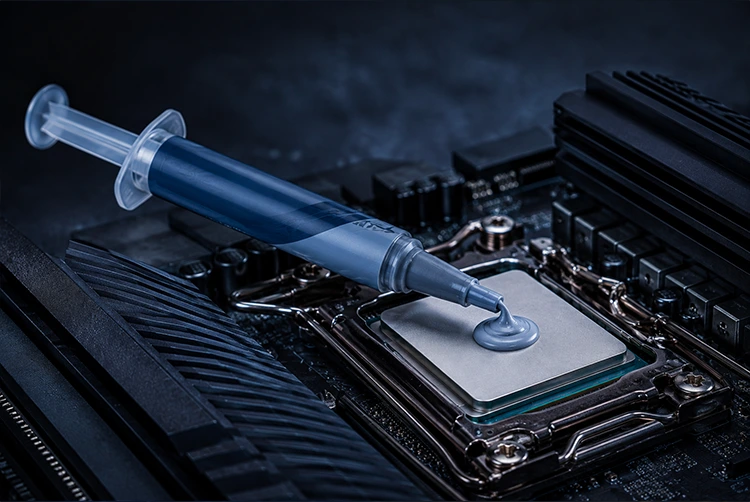
Arctic MX-6 is the thermal paste that the PC building community keeps recommending not because of flashy marketing or extreme specifications, but because it actually delivers what most people need: excellent thermal performance, a 8-year lifespan, non-conductive safety, and a price that makes you wonder what the expensive alternatives are actually charging for.
Since its launch in 2022 as the successor to the widely beloved MX-4, and through four revisions that have progressively improved its formula, MX-6 has become the default recommendation for gaming builds, workstations, laptop repasting, and GPU applications. The most recent revision Rev 4 with the 2025 new formula represents a measurable improvement over the original release, with laboratory testing confirming halved thermal resistance at thin application layers compared to the first-generation compound.
For players building or upgrading gaming PCs who want to combine better thermal management with system-level performance improvements, our Best thermal paste for cpu covers driver settings, Windows configuration, and hardware tweaks that work alongside better cooling to produce meaningfully better gaming performance. And for the complete context on how MX-6 fits into the full thermal paste market.
What Is Arctic MX-6?
Arctic MX-6 (model numbers ACTCP00079A for 2g and ACTCP00080A for 4g and ACTCP00081A for 8g) is Arctic’s current flagship thermal paste, designed and manufactured by ARCTIC GmbH a German company with over 20 years of experience in the PC cooling market. It succeeds the MX-5 (which had a short production run) and is based on the proven MX-4 formula, redesigned with the goal of offering a first-class product at a fair price.
MX-6 is a non-electrically conductive, non-capacitive thermal compound. Its silicone gel carrier enables optimal distribution through contact pressure meaning it spreads correctly under cooler mounting pressure without requiring manual spreading. It reaches its maximum performance without burn-in, directly after application and distribution. This distinguishes it from phase-change compounds and some competing formulas that require thermal cycling before delivering peak performance.
The MX-6 is built around a core design philosophy that Arctic describes as offering versatile application possibilities with easy-to-use consistency simultaneously targeting CPU applications, GPU repasting, laptop thermal interfaces, and gaming console maintenance with a single compound.
Technical Specifications Full Breakdown
| Specification | Arctic MX-6 |
|---|---|
| Product Model | ACTCP00079A (2g) / ACTCP00080A (4g) / ACTCP00081A (8g) |
| Viscosity | 45,000 Poise |
| Density | 2.6 g/cm³ |
| Continuous Use Temperature | -50°C to 150°C |
| Volume Resistivity | 1.8 × 10¹² Ω-cm |
| Breakdown Voltage | 7.5 kV/mm |
| Electrically Conductive | No |
| Electrically Capacitive | No |
| Burn-in Required | No full performance at first application |
| Rated Lifespan | Up to 8 years |
| Compatible Surfaces | All metals copper, aluminum, nickel-plated |
| Available Sizes | 2g, 4g, 8g |
| Current Revision | Rev 4 (2025 formula) |
Understanding the Key Specifications
Viscosity at 45,000 Poise: This is one of the most important and most misunderstood specifications of the MX-6. Previous Arctic pastes had dramatically lower viscosity MX-5 was at 550 Poise and MX-4 at 870 Poise. MX-6’s 45,000 Poise is roughly 50x thicker than MX-4. This might sound like a negative, but it is actually the primary reason MX-6’s longevity far exceeds previous Arctic formulas.
Higher viscosity means the compound resists the pump-out effect the gradual migration of thermal paste outward from between CPU and cooler over repeated heat cycling. Thinner pastes like Kryonaut and MX-4 are more prone to pump-out, particularly in high-heat GPU applications where temperatures cycle more aggressively. MX-6’s thick formulation resists this movement, maintaining a consistent thermal layer for years rather than months.
The same high viscosity that prevents pump-out does make the paste slightly more resistant to manual spreading but since Arctic recommends applying it as a dot and letting cooler pressure distribute it, this characteristic is a feature rather than a limitation.
Volume Resistivity at 1.8 × 10¹² Ω-cm and Breakdown Voltage at 7.5 kV/mm: These specifications confirm the MX-6’s non-conductive properties at levels that provide genuine electrical safety. For comparison, MX-4’s breakdown voltage was listed as N/A and MX-5’s was only 250 V/mm. MX-6’s 7,500 V/mm breakdown voltage means that even under extreme circumstances, the paste acts as a strong electrical insulator. This is the highest electrical safety specification Arctic has achieved in their paste lineup.
-50°C to 150°C operational range: The MX-6 maintains its thermal properties from extreme cold to 150°C covering the full operating temperature range of any consumer or prosumer CPU without degradation at either extreme. This range is appropriate for standard overclocking temperatures and most professional workstation applications.
8-year rated lifespan: Arctic rates the MX-6 for up to 8 years of continuous operation. This is backed by the non-drying and non-bleeding properties built into the formula and confirmed in practice by users who have found the paste retaining its original consistency after years of use in systems that earlier versions of the paste would have dried out in. Real-world user reports of finding MX-4 paste still wet and creamy after four or more years suggest Arctic’s longevity claims have historical grounding.
Temperature Performance Real Benchmark Data
Arctic MX-6 currently holds the 2nd best spot for traditional thermal pastes in professional benchmark databases behind only ID-Cooling Frost X45 in the most recent comprehensive comparison.
MX-6 vs MX-4 How Much Better Is It?
With its improved composition, the MX-6 has a measurably lower thermal resistance than the MX-4. Arctic measured the absolute thermal resistance of both pastes on laboratory testing equipment, confirming the improvement.
In real-world CPU testing, the temperature difference between MX-4 and MX-6 is typically 1–3°C. This gap widens when conditions favor thinner application layers where Rev 4’s improved thin-layer performance becomes more pronounced. For a system that has been running with MX-4 for several years where the paste has partially dried, the improvement from switching to fresh MX-6 is considerably larger the degradation of old paste accounts for far more than the formulation difference between fresh versions.
MX-6 vs Kryonaut The Benchmark Competition
In testing with seven thermal pastes including Arctic MX-6, Thermal Grizzly Kryonaut, and Noctua NT-H2, the three front-runners were so close in average temperatures from three runs with just 0.3°C difference that results fall within measurement error tolerance.
In higher-TDP testing with a Core i9-13900K at 5.8 GHz, Kryonaut maintains temperatures 3–5°C lower than MX-6. The gap between them is measurable but modest in standard gaming configurations; it becomes more meaningful specifically in extreme-performance scenarios where sustained high-core-count loads keep the CPU at or near its thermal limit continuously.
For practical gaming PC use: the difference between MX-6 and Kryonaut in real gameplay is typically not the deciding factor in whether a CPU boosts or throttles. For a 65W CPU in a standard gaming build, MX-6 performs effectively identically to Kryonaut in practice. On a 150W+ CPU being heavily overclocked, Kryonaut’s 3–5°C advantage begins to provide meaningful headroom.
The Longevity Advantage Over Kryonaut
Where MX-6 clearly outperforms Kryonaut is in sustained long-term stability. Kryonaut is focused on thermal conductivity at the expense of longevity it doesn’t get the best results in how long it lasts. Kryonaut stuff can pump out within three months on warm graphics cards. MX-6’s 45,000-Poise viscosity was specifically engineered to resist this.
For a GPU application specifically which runs hotter and cycles temperatures more aggressively than most CPUs MX-6’s resistance to pump-out makes it the practical choice over Kryonaut even if Kryonaut shows marginally better fresh-applied temperatures.
Real User Benchmark Example
One documented real-world result: a gaming PC that had been idling at 60°C and spiking into the 90s under moderate load due to degraded factory thermal paste. After cleaning both surfaces and applying MX-6: idle temperature dropped to 35°C, full-load temperatures now stay in the low 70s. No more thermal throttling, no sudden shutdowns. This type of outcome replacing dried paste with fresh MX-6 is the most common and most dramatic result users report, because old degraded paste adds far more thermal resistance than any fresh paste can claim to remove.
Package Sizes and Pricing
Arctic MX-6 is available in three sizes:
| Size | Approximate Applications | Ideal Use |
|---|---|---|
| 2g tube | 8–10 CPU applications | Single build, occasional maintenance |
| 4g tube | 15–20 CPU applications | Enthusiast builder, multiple systems |
| 8g tube | 30–40 CPU applications | Professional builder, shop use, frequent maintenance |
Pricing context: MX-6 was recently at an all-time low price on major retail platforms, making its value proposition even stronger relative to competing premium pastes that charge significantly more for marginally better performance in high-TDP scenarios.
The price difference between MX-6 and Kryonaut is notable in independent testing, MX-6 can keep up with Kryonaut (which is typically twice the entry price) and competing NT-H2 (typically three times the entry price) in standard test conditions, while also being easier to apply. The premium paste category charges a premium largely for the 2–5°C advantage that appears primarily in high-TDP overclocked scenarios.
Application Guide How to Apply Arctic MX-6
What Arctic Recommends
Arctic is explicit in their application guidance: apply MX-6 in a simple dot or cross pattern and let the CPU cooler do the rest. The pressure from the cooler will evenly spread the MX-6, filling in any gaps and giving complete coverage. This approach is particularly effective for coolers with direct-touch heat pipes.
The silicone gel carrier in MX-6 is specifically designed for pressure-distribution. Manual spreading introduces bubbles and uneven layer thickness. The dot method produces better thermal contact than hand-spreading the same amount of compound.
Step-by-Step Application
Step 1 — Clean Both Surfaces Thoroughly
Before applying MX-6, both the CPU IHS and cooler contact plate must be completely clean. Use isopropyl alcohol at 90%+ concentration with a lint-free cloth. Wipe in a single direction rather than scrubbing in circles circular motion redistributes dissolved old paste across the surface. Allow both surfaces to air-dry for at least 60 seconds before proceeding.
If removing MX-6 specifically, note that the high-viscosity formulation comes off cleanly without leaving residue. It does not harden or adhere to metal surfaces in the way some older compounds did.
Step 2 — Measure the Correct Amount
MX-6’s high viscosity (45,000 Poise) means it is less forgiving of over-application than thinner pastes in terms of visual appearance a large excess will squeeze beyond the IHS more slowly but still represents wasted compound and potential mess during cooler mounting.
Standard desktop CPU: A dot approximately 3–4mm in diameter centered on the IHS. For CPUs with larger die areas (Intel Core i9 full-die, AMD Ryzen 9 with multi-chiplet design): a cross pattern using a rice-grain amount of paste per arm provides better initial coverage before pressure distributes it.
Laptop GPU and CPU: Use a smaller dot, approximately 2–3mm laptop thermal interfaces have less mounting pressure to distribute paste and less surface area to cover. A smaller amount ensures coverage without overflow near delicate components.
Step 3 — Apply and Mount
For standard CPU applications: Place the dot and mount the cooler directly do not spread manually. Lower the cooler straight down onto the CPU without sliding or rotating.
For direct-touch heat pipe coolers: A slightly heavier application may be needed to ensure coverage between the exposed heat pipe gaps. Consider applying a thin line across each heat pipe contact line rather than a single central dot.
Step 4 — Mount and Torque Correctly
Tighten mounting hardware in an X pattern one corner, the diagonal opposite, then the remaining two in the same alternating sequence. This ensures even pressure distribution across the IHS surface. Uneven mounting is the most common cause of unexpectedly high temperatures after repasting, particularly with MX-6’s high viscosity where uneven pressure produces uneven distribution.
Step 5 — Verify (Optional but Recommended for First Use)
After an initial thermal cycle boot the system, run a stress test or gaming session, shut down remove the cooler and examine the paste contact imprint. MX-6 should show consistent coverage of the CPU die area (the central region of the IHS). Incomplete coverage indicates the application amount or cooler pressure distribution needs adjustment.
Arctic MX-6 for GPU Repasting
MX-6 is fully suitable for GPU repasting. Its non-conductive and non-capacitive formulation provides safety even in the GPU context where paste is applied between a bare die and a large, complex metal vapor chamber or heat pipe array with other electrical components in proximity.
The pump-out advantage is especially relevant for GPUs: Graphics cards cycle through higher temperatures more frequently than CPUs during gaming sessions from idle temperatures in the 30s to full-load temperatures approaching 80–90°C, multiple times per session. This thermal cycling is precisely where lower-viscosity pastes like Kryonaut pump out within months. MX-6’s 45,000-Poise formula holds its position through this cycling, making it the more practical choice for GPU applications despite Kryonaut’s marginally better fresh-applied thermal conductivity.
One user’s GPU experience: Applied MX-6 on a high-end graphics card and reported it only about 1°C hotter than a premium high-performance competing paste, while noting the competing paste needed changing after 2–3 months of degradation. MX-6 in the same period maintained stable performance.
Application note for GPUs: Apply a smaller amount than for CPU a 2mm dot for laptop GPUs, a 3mm dot for desktop GPUs. GPU dies are often smaller than CPU IHS areas, and GPU coolers vary in mounting pressure. Direct-die GPU applications (without IHS) benefit from applying a very thin, even coat rather than a dot, as the bare silicon surface and large metal vapor chamber have different pressure-distribution behavior than IHS-to-cooler contact.
Arctic MX-6 for Laptop Repasting
Laptop repasting with MX-6 is one of the most impactful applications of the compound. Factory thermal paste on laptops frequently degrades faster than on desktop CPUs due to thinner application layers, more aggressive thermal cycling, and lower cooler mounting pressure. A laptop that is running 10–15°C hotter than when it was new is almost always suffering from degraded thermal paste.
Expected improvement from laptop repasting with MX-6:
- Light thermal throttling: 5–10°C reduction, throttling eliminated
- Moderate degradation (2–3 years old): 8–15°C reduction
- Severe degradation (4+ years, dried paste): 15–25°C reduction
These improvements translate directly into sustained performance a laptop that was throttling its CPU to 50W TDP from a 75W rated TDP due to thermal limits will return to 75W operation after successful repasting, restoring the performance the hardware was designed to deliver.
Laptop-specific application notes:
- Clean both CPU and GPU thermal interfaces simultaneously both are likely equally degraded
- Check whether the laptop uses direct-die (bare silicon to heat pipe) or IHS-to-heat-pipe thermal interfaces check disassembly guides for your specific model
- Apply particularly thin layers on direct-die laptop applications the gaps are smaller and the mounting pressure is lower than desktop configurations
- Verify heat pipe metal compatibility before any GPU application that might be near components MX-6 is non-conductive, so this is less critical than with conductive compounds, but good practice
Who Should and Should Not Buy Arctic MX-6
The Right Buyer for Arctic MX-6
Standard gaming PC builder (the overwhelming majority of people asking this question): MX-6 delivers within 0.3°C of premium alternatives in this configuration. The 8-year lifespan means build once, apply once, not think about it again until the next upgrade. This is the correct choice.
Anyone replacing old dried thermal paste: The improvement from replacing old degraded paste with any quality fresh compound is far greater than the difference between paste brands. MX-6 at its price point makes this maintenance upgrade economical.
Laptop repaster: The pump-out resistance and non-conductive safety make MX-6 ideal. The temperature improvements from laptop repasting justify the effort regardless of which quality paste is chosen; MX-6’s longevity means the improvement persists.
GPU repaster: Pump-out resistance in high thermal-cycling GPU applications makes MX-6 more appropriate than thinner competing pastes despite marginally lower fresh-applied conductivity.
Anyone who values long-term stability over benchmark margin: MX-6’s formula is specifically engineered for sustained performance. If you want to forget about your thermal paste for 5–8 years and have confidence it is still performing correctly, MX-6 is the product this describes.
First-time builders: Non-conductive, non-capacitive, no burn-in required, no manual spreading required, forgiving of slight over or under-application. MX-6 is among the most beginner-friendly quality pastes available.
When to Choose Something Else Instead
Extreme overclocking or sustained 200W+ workloads: Kryonaut Extreme provides a measurable 3–5°C advantage at these thermal levels. On a heavily overclocked flagship CPU where every degree of thermal headroom translates into sustainable clock speed, the premium paste justifies its premium price.
Maximum performance regardless of complexity: Liquid metal compounds (gallium alloys) outperform MX-6 by 10–20°C in compatible setups. Experienced builders on copper or nickel-plated copper coolers who have verified aluminum is absent from their thermal interface can access this performance tier.
Budget constraint is the primary factor: If the price difference between MX-6 and budget generic compounds is genuinely the constraint, those compounds will provide adequate performance on low-TDP processors. The upgrade to MX-6 is justified whenever the CPU is a modern mid-range or high-end chip.
Arctic MX-6 vs MX-4 Should You Upgrade?
This is one of the most common questions from existing MX-4 users. The answer depends on your specific situation:
If your MX-4 is freshly applied and you’re deciding which to use for a new build: Use MX-6. It performs measurably better in laboratory testing, resists pump-out better than MX-4, and has superior electrical safety specifications (7,500 V/mm vs MX-4’s N/A rated breakdown voltage).
If your MX-4 is several years old in a running system: Replace it with MX-6 regardless of which paste you’d prefer to use. Aged paste whether MX-4 or any other compound loses thermal performance over time. Fresh MX-6 will outperform aged MX-4 significantly. How much the improvement is depends on how degraded the MX-4 has become.
If your MX-4 is under two years old in a cool-running system: There is no urgency to replace it. MX-4 continues to perform well for 3–5 years in cool, stable desktop configurations. When it eventually comes time to reapply, use MX-6.
The viscosity difference in practice: MX-4 at 870 Poise feels noticeably more fluid than MX-6 at 45,000 Poise. Users switching from MX-4 to MX-6 consistently report that MX-6 is thicker and slightly more resistant to initial spreading from cooler pressure alone but that it distributes correctly once mounting screws are fully tightened. The application technique (dot method, let pressure distribute) is the same for both.
Arctic MX-6 vs Competitors Full Comparison Table
| Compound | Viscosity | Longevity | Pump-Out Risk | Electrical Safety | Performance vs MX-6 | Price Tier |
|---|---|---|---|---|---|---|
| Arctic MX-6 | 45,000 P | 8 years | Very low | Excellent | Baseline | Low |
| Arctic MX-4 | 870 P | 3–5 years | Low | Good | -1 to -2°C | Very Low |
| Noctua NT-H2 | High (similar to MX-6) | 5 years | Low | Excellent | Within error margin | Medium |
| Thermal Grizzly Kryonaut | ~40 P (thin) | 1–3 years | High (GPU) | Excellent | +1 to +5°C | Medium-High |
| Thermal Grizzly Kryonaut Extreme | Higher than Kryonaut | 2–4 years | Medium | Excellent | +3 to +6°C | High |
| Thermal Grizzly Conductonaut | Liquid | Varies | Very low | Conductive ⚠️ | +10 to +20°C | High |
Frequently Asked Questions
What is Arctic MX-6?
Arctic MX-6 is a premium non-electrically conductive thermal paste manufactured by Arctic GmbH, designed for use between CPU/GPU processors and their cooling solutions. It is the current flagship thermal compound in Arctic’s product lineup, succeeding MX-5 and based on the proven MX-4 formula with significant performance improvements.
What is the thermal conductivity of Arctic MX-6?
Arctic has not published a standalone W/mK figure for MX-6, citing that thermal resistance (Rth) measurement is a more accurate metric than bulk thermal conductivity alone. The Rev 4 formula achieves a bulk thermal conductivity of approximately 4.748 W/mK in controlled laboratory testing, with thermal resistance significantly lower than the original formula — halved at thin application layers compared to the first revision.
How long does Arctic MX-6 last?
Arctic rates MX-6 for up to 8 years of continuous operation. Its high viscosity (45,000 Poise) and non-drying formulation are the primary mechanisms behind this longevity rating. Real-world reports consistently confirm Arctic’s MX-series pastes retain their consistency for multiple years in active systems.
Does Arctic MX-6 need burn-in time?
No. MX-6 reaches its maximum performance without burn-in, directly after application and distribution. This distinguishes it from phase-change materials that require multiple thermal cycles and some competing compounds that perform slightly better after initial settling.
Is Arctic MX-6 safe to use?
Yes. MX-6 is non-electrically conductive and non-capacitive, with a breakdown voltage of 7.5 kV/mm. Accidental overapplication that contacts motherboard traces, capacitors, or CPU socket pins will not cause electrical damage. This makes it the safest category of thermal compound for general use.
