

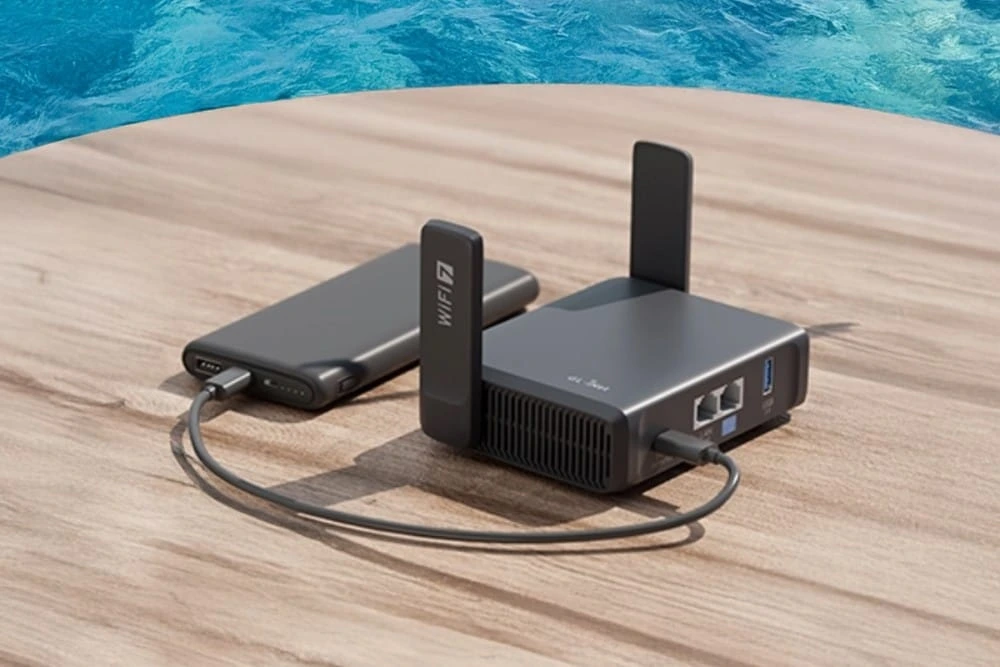
A travel router is the one piece of gear most traveling gamers forget, and the one that fixes the most problems. Hotel Wi-Fi is shared by dozens or hundreds of guests at once, and many networks cap the number of devices per room. Xbox consoles cannot sign in to networks that require a browser login page, which rules out most hotels. A pocket router that weighs around 200 grams solves all of this.
What is a travel router, exactly?
A travel router is a compact, portable router designed to create your own private Wi-Fi network anywhere. It takes an internet source (hotel Wi-Fi, an Ethernet cable, a USB-tethered phone or a SIM card) and rebroadcasts it as a network that you control.
For gamers, this means one thing: your console, laptop and handheld connect to the same familiar network in every city. You log in to the hotel portal once, on the router. Every device behind it is online instantly.
Popular examples include the GL.iNet Beryl AX (GL-MT3000) and the GL.iNet Slate AX (GL-AXT1800). Both fit in a jacket pocket and run on USB-C power.
How does a travel router work for gaming?
A travel router can run in several modes. Each one matters differently for latency.
Repeater mode: The router connects to the hotel Wi-Fi and creates your own network. Easiest setup, but you inherit the hotel’s congestion.
Router mode (Ethernet): You plug the hotel’s wall Ethernet port into the router. This is the most stable option for online play.
Tethering mode: The router takes a connection from your phone via USB. Useful when hotel Wi-Fi is unusable.
Cellular mode: Some models, like the GL.iNet Mudi V2 or Puli AX, take a physical SIM card and act as a mobile hotspot.
Most GL.iNet models also support VPN protocols like WireGuard, which helps when you need to reach your home region’s servers.
Why gamers need a travel router at tournaments and conventions
Gaming events are the worst environments for connectivity. Thousands of attendees saturate venue Wi-Fi, and hotel networks near major conventions get hammered every evening.
A travel router gives you four concrete advantages:
- Captive portal bypass for consoles: Log in once on the router, and your Xbox or PlayStation connects without a browser.
- No device limits: The hotel sees one device, not five.
- Security: Your gear sits behind a private network, not on a shared public one.
- Consistency: Same network name and password everywhere, so no reconfiguring before a scrim.
Travel router setups ranked: the Lag Risk Grid
Not every setup is equal. Here is our ranking for competitive and streaming use, from best to worst.
| Rank | Setup | Stability | Best for |
| 1 | Travel router + hotel Ethernet | Excellent | Ranked play, tournaments |
| 2 | Travel router + 5G phone tethering | Good, location-dependent | Streaming, backup line |
| 3 | Travel router in repeater mode | Average | Casual play, downloads |
| 4 | Console directly on hotel Wi-Fi | Poor | Nothing serious |
| 5 | Venue Wi-Fi during an event | Very poor | Avoid entirely |
Our verdict is clear: if the room has an Ethernet port, use it. Repeater mode is a convenience tool, not a competitive solution. Always test your ping before any match. As a rule of thumb, under 50 ms is playable, and competitive players aim much lower.
Travel router and eSIM: the backup every streamer needs
Wi-Fi fails. A mobile data connection is your safety net, especially for streamers who cannot afford a dropped broadcast.
The smartest combo is simple. Install a data eSIM on your phone before departure, then tether it to your travel router by USB. Your whole setup switches to mobile data in seconds. Most travel routers do not accept eSIMs directly, so the phone acts as the bridge.
Providers like Holafly offer travel data plans you can install before you fly, available at https://esim.holafly.com/. Before relying on tethering, check the hotspot conditions of your plan, as they vary between offers.
Keep in mind that mobile latency depends on local coverage. 5G in a city center can rival hotel Wi-Fi. Rural 4G will not.
How to choose a travel router for gaming
Focus on what affects your play, not marketing specs:
- Ethernet ports: At least one WAN and one LAN port. Non-negotiable.
- Wi-Fi standard: Wi-Fi 6 minimum. Wi-Fi 7 models like the GL.iNet Slate 7 exist for high-end setups.
- USB tethering support: Essential for the eSIM backup strategy.
- Power: USB-C, so it runs from a laptop charger or power bank.
- VPN support: WireGuard performance matters if you play on home servers.
FAQ: what is a travel router and do you need one?
Is a travel router the same as a mobile hotspot?
No. A mobile hotspot creates internet from cellular data. A travel router mainly redistributes an existing connection, though some models include a SIM slot.
Does a travel router reduce ping?
Not by itself. It improves stability and lets you use Ethernet, which usually lowers and stabilizes ping compared to crowded hotel Wi-Fi.
Can I use a travel router with a Nintendo Switch or Steam Deck?
Yes. Any Wi-Fi device can connect to it like a normal home network.
Is a travel router worth it for one trip?
If you plan to play online or stream, yes. Entry models cost less than a night in most convention hotels.
