

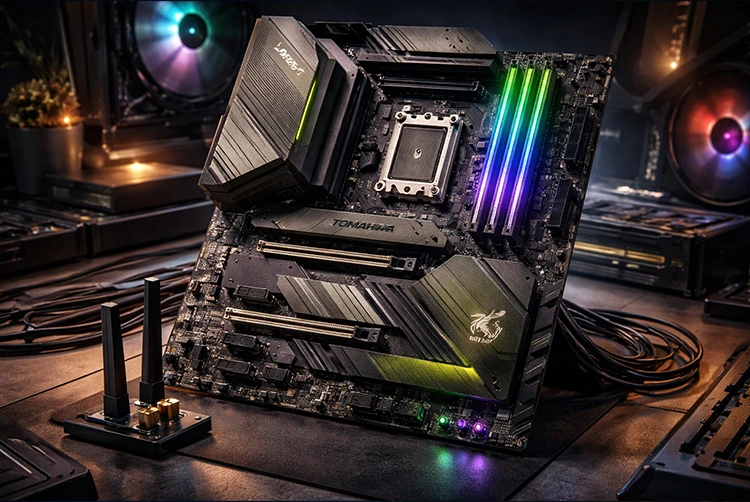
If you’re building a new Ryzen 9000-series PC in 2026 and want flagship-level features without flagship pricing, the MSI MAG X870 Tomahawk WiFi stands out as one of the smartest choices on the AM5 platform. This ATX motherboard delivers Wi-Fi 7, 5Gbps LAN, USB4 (40Gbps) ports, full PCIe 5.0 support, robust power delivery, and MSI’s signature Tomahawk durability all at a street price that consistently beats higher-end X870E boards by $50–100 while giving you 95% of their real-world performance.
Whether you’re pairing it with a Ryzen 7 9800X3D for gaming dominance or a Ryzen 9 9950X for content creation, the MAG X870 Tomahawk strikes the perfect balance of features, thermals, and future-proofing. Here’s the complete 2026 breakdown to help you decide if it’s the right board for your next build.

The MAG X870 Tomahawk WiFi in all its glory — sleek black-and-yellow design with easy-access M.2 slots and reinforced PCIe.
Full Specifications
- Chipset / Socket: AMD X870 / AM5
- Form Factor: ATX
- VRM: 14+2+1 Duet Rail Power System with 80A Smart Power Stages (excellent for 170W+ CPUs even under heavy overclocking)
- Memory: 4x DDR5 slots, up to 256GB, 8000+ MT/s (AMD EXPO ready)
- Storage: 4x M.2 (one PCIe 5.0 x4, others PCIe 4.0/5.0) + 4x SATA 6Gb/s
- Expansion: PCIe 5.0 x16 (GPU), additional PCIe 4.0 slots
- Connectivity: Wi-Fi 7 + Bluetooth 5.4, 5Gbps LAN, 2x USB4 Type-C (40Gbps, Thunderbolt 4 compatible), multiple USB 3.2 Gen 2/1, HDMI 2.1 + DisplayPort
- Audio: Realtek ALC1220 or better with premium capacitors
- Other Features: EZ M.2 clips, EZ PCIe release lever, Flash BIOS button, robust FROZR heatsinks, ARGB headers, Q-LED diagnostics
This board supports the full Ryzen 9000, 8000G, and 7000 series out of the box with the latest BIOS.

Close-up of the robust VRM and heatsink design — plenty of cooling surface area for sustained high-core-count workloads.
Design, Build Quality & Cooling
MSI’s Tomahawk series has always been about military-grade toughness meets clean aesthetics, and the X870 version continues that tradition. The black PCB with yellow accents looks sharp in any build, especially with matching MSI GPUs or RAM. The reinforced PCIe slot, sturdy M.2 heatsinks, and thick FROZR cooling on the VRM and chipset keep temperatures in check even during extended 9800X3D or 9950X sessions.
One standout is the generous I/O: two full-speed USB4 ports that double as Thunderbolt 4 make it future-proof for high-bandwidth peripherals, docks, and external GPUs. The rear panel is packed yet well-organized, and the included Wi-Fi 7 antenna delivers excellent signal strength for low-latency online gaming.
If you’re worried about thermals in a high-end build, this board’s VRM design is more than capable—pair it with good case airflow and you’ll stay well under throttling limits. For detailed cooling tips, check our PC overheating guide to keep your Ryzen 9000 running cool and quiet.
Performance & Overclocking
In 2026 benchmarks and user reports, the MAG X870 Tomahawk WiFi handles Ryzen 9 9950X and 9800X3D builds without breaking a sweat. The 14+2+1 phase VRM with dual 8-pin power connectors provides stable voltage even under heavy loads or light overclocking. Memory overclocking is straightforward with EXPO profiles pushing DDR5-8000+ reliably.
Storage performance shines with full PCIe 5.0 M.2 support—perfect for the latest Gen5 SSDs that deliver blistering speeds for game loading and content creation. USB4 ports enable fast external storage or 8K displays without bottlenecks.
For gamers, the combination of Wi-Fi 7 and 5Gbps LAN keeps latency low in competitive titles. Pair this board with modern GPUs and our next-gen DLSS 5 upscaling guide to squeeze every frame out of your system without pushing thermals too hard.
Gaming & Productivity Real-World Use
This is an excellent all-rounder for:
- High-refresh 1440p/4K gaming — Stable power delivery keeps frame rates consistent.
- Content creation & streaming — Plenty of USB ports and fast storage for multiple drives and peripherals.
- Future-proofing — USB4, Wi-Fi 7, and PCIe 5.0 ensure it stays relevant for years.
It’s not the absolute flagship (that’s the MPG/X870E Godlike series), but for 95% of builders it offers better value than pricier boards with marginal gains.
If you play online multiplayer, stable networking is key our Fix High Ping Fast guide pairs perfectly with this board’s strong LAN and Wi-Fi 7.
Pros & Cons
Pros
- Outstanding value at ~$240–260
- Feature-packed I/O (USB4, Wi-Fi 7, 5G LAN)
- Strong VRM for high-end Ryzen CPUs
- Easy-to-use EZ features and BIOS
- Clean aesthetics and solid build quality
- Excellent future-proofing
Cons
- X870 (non-E) has slightly fewer native PCIe lanes than X870E models
- No 10G LAN (but 5G is more than enough for most)
- Some users note minor BIOS quirks on early units (fixed in 2026 updates)
Compared to the X870E Tomahawk or competitors like ASUS/Gigabyte equivalents, the standard Tomahawk wins on price-to-performance for most gamers and creators.
Who Should Buy the MSI MAG X870 Tomahawk WiFi?
- Gamers building a Ryzen 9000 system who want top-tier connectivity without overspending
- Content creators needing fast storage and USB4
- First-time builders who appreciate MSI’s user-friendly BIOS and EZ features
- Anyone upgrading from X670 who wants modern Wi-Fi 7 and USB4
If you need maximum PCIe lanes or 10G LAN, step up to an X870E model. For budget builds, the B850 Tomahawk is also worth a look—but the X870 version future-proofs you better.
Final Verdict
In 2026, the MSI MAG X870 Tomahawk WiFi is one of the best mid-to-high-end AM5 motherboards available. It delivers nearly every modern feature gamers and creators actually use—without the premium tax of Godlike or Edge models. Strong VRM, excellent connectivity, easy installation, and rock-solid performance make it a no-brainer for most Ryzen 9000 builds.
If you’re ready to build, this board will serve you well for years. Pair it with good cooling (see our PC cooling and overheating solutions ) and you’ll have a system that stays cool, fast, and reliable.
FAQs
Is the MAG X870 Tomahawk WiFi worth it in 2026?
Yes—excellent value with Wi-Fi 7, USB4, and strong VRM at a competitive price.
Does it support Ryzen 9000X3D CPUs out of the box?
Fully supported with the latest BIOS. Perfect pairing for gaming.
X870 vs X870E Tomahawk which to choose?
The standard X870 Tomahawk is sufficient for most users and saves money. Go X870E only if you need extra PCIe lanes or specific USB4 configurations.
Is the VRM good enough for overclocking?
Yes, handles 170W+ CPUs comfortably with headroom for light overclocking or PBO.
The MSI MAG X870 Tomahawk WiFi proves you don’t need to spend flagship money for flagship features. It’s the smart, balanced choice for 2026 AM5 builds. Ready to build? Grab one and pair it with the best components your next high-performance rig awaits.
