

Call of Duty: Black Ops 6 (BO6), Treyarch’s gritty return to the Black Ops saga, launched in October 2024 and remains a multiplayer juggernaut in 2026. With omni-movement, round-based Zombies, and seamless Warzone integration, one burning question for squad-hunters: Is Black Ops 6 cross platform? The answer is a resounding yes, full crossplay across all major platforms, paired with robust cross-progression via your Activision account.
Black Ops 6 Supported Platforms for Crossplay
BO6 boasts broad compatibility, including last-gen consoles for cross-gen play. Here’s the full list:
| Platform | Crossplay Supported | Notes |
|---|---|---|
| PC (Steam) | Yes | Cannot disable crossplay |
| PC (Battle.net) | Yes | Cannot disable |
| PC (Microsoft Store/Xbox App) | Yes | Adjustable via Xbox settings |
| PlayStation 5 | Yes | Full settings control |
| PlayStation 4 | Yes | Cross-gen with PS5 |
| Xbox Series X/S | Yes | Full settings |
| Xbox One | Yes | Cross-gen with Series X/S |
No Nintendo Switch or mobile—it’s console/PC focused. Cross-gen bundles (e.g., PS4/PS5) ensure seamless upgrades without losing progress.
Crossplay in Black Ops 6: How It Works Across Modes
Crossplay is enabled by default and required for an Activision account login, enabling you to squad with friends anywhere. It covers:
- Multiplayer (Core, Ranked, Hardpoint): Full crossplay; console players can opt for “Console Only” since Season 3 (April 2025).
- Zombies: Unlimited co-op across platforms—perfect for high-round Easter eggs.
- Warzone: Integrated from Season 1; BR, Resurgence, and Ranked all crossplay-enabled, with shared progression.
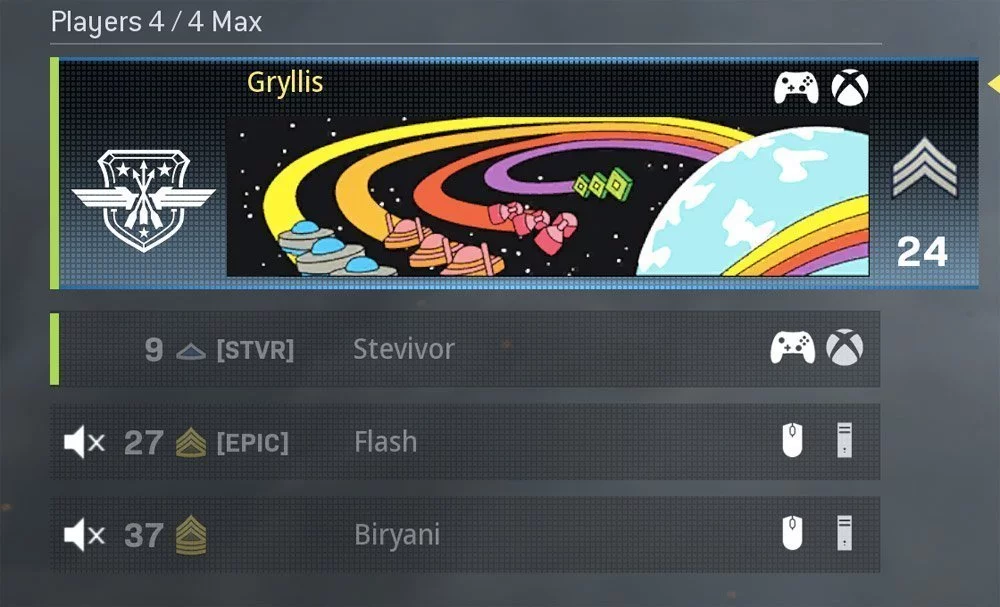
Player icons in lobbies show platforms (controller for console, mouse/keyboard for PC). Input-based matchmaking separates controller vs. MnK for fairness.
Cross-Progression: What Carries Over Your Activision Account
The killer feature: All progression syncs instantly across linked platforms—no starting over if you switch from PS5 to Steam. Key carryovers:
| Feature | Carries Over? | Details |
|---|---|---|
| Player Level & Prestige | Yes | Total XP from MP/Zombies/Warzone |
| Weapon Levels & Camos | Yes | All unlocks, attachments |
| Battle Pass Tiers | Yes | Shared across modes |
| Store Bundles/Skins | Yes | Purchased items |
| Zombies Schematics/Upgrades | Yes | Round-based progress |
| Warzone Loadouts | Yes | Integrated |
Link accounts once via in-game prompt—progress merges automatically. Pro tip: Use the same Activision ID everywhere for seamless friend lists.
How to Link Your Activision Account for Crossplay & Progression
- Launch BO6 and select Multiplayer/Zombies/Warzone.
- At login screen, create or sign in with Activision ID (email/password).
- Verify email; link PSN/Xbox/Steam/Battle.net accounts.
- Done—progress syncs in real-time.
How to Enable/Disable Crossplay in Black Ops 6 {#enable-disable}
PC (Steam/Battle.net): Cannot disable—always on for biggest lobbies.
PC (Microsoft Store/Xbox App): Xbox app > Profile > Privacy > Online Safety > Allow cross-network play (toggle off).
Consoles (PS5/PS4, Xbox Series/One):
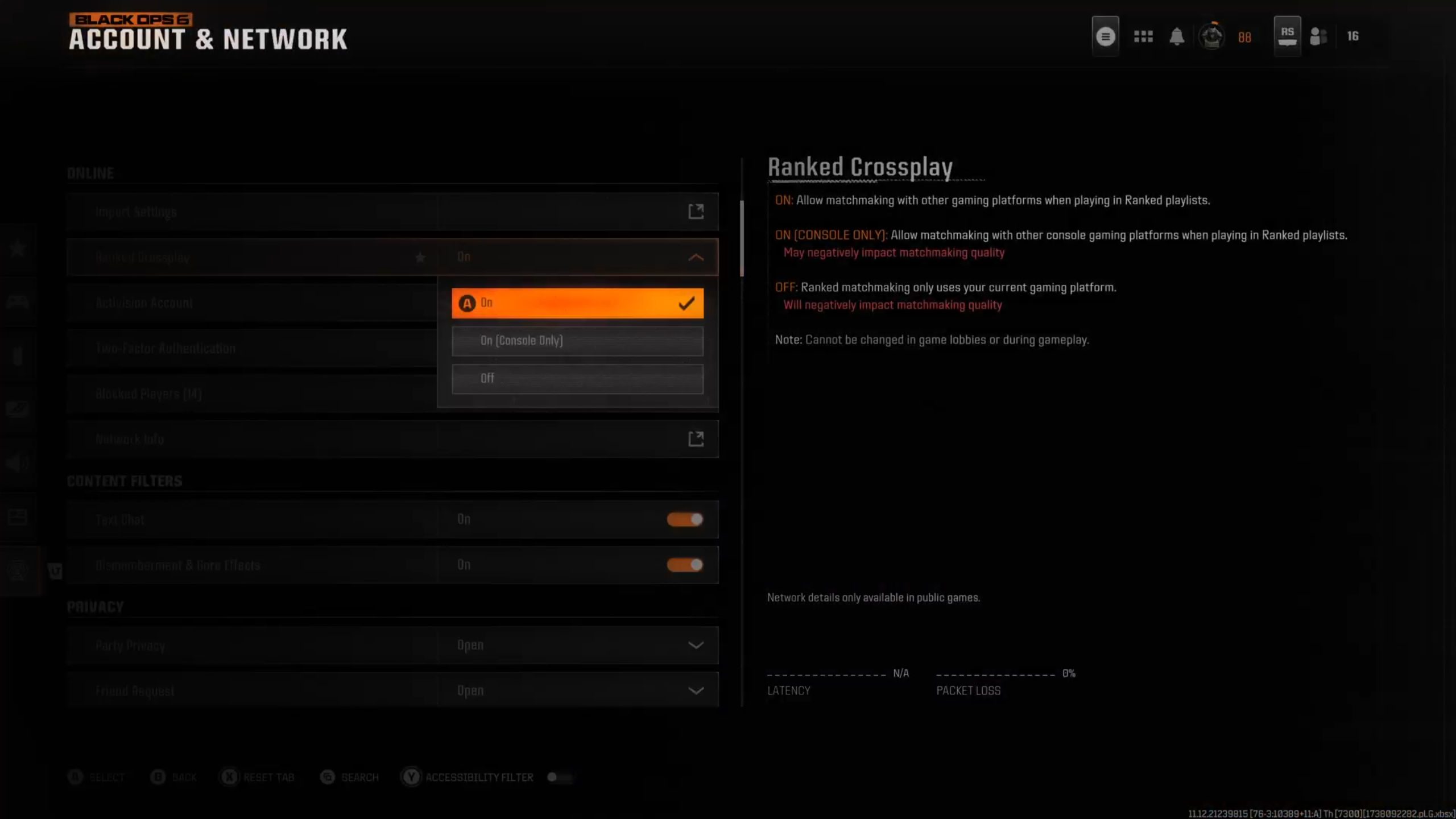
- In BO6 main menu: Settings > Account & Network.
- Select Crossplay (Unranked/Ranked/Warzone separately):
- ON: All platforms.
- ON (Console Only): Consoles + Microsoft Store PC (avoids Steam/Battle.net hackers).
- OFF: Solo platform matchmaking (longer queues).
Xbox: Also via console settings > General > Online Safety > Privacy > Cross-network play.
Warning: OFF/Console Only slows matchmaking—use for anti-cheat peace.

How to Add Cross-Platform Friends
- In BO6: Social tab > Search Activision ID (e.g., Player#1234567).
- Party up—invites work across platforms.
- Voice chat auto-enabled in crossplay parties.
Cross-Generation Play in BO6
PS4 players join PS5 lobbies; Xbox One with Series X/S. Buy cross-gen bundles for dual access—progress shared.
Matchmaking, SBMM, & Input in Crossplay
Skill-Based Matchmaking (SBMM) is connection-priority with skill. Input-based pools prevent MnK vs. controller mismatches.
Common Crossplay Issues & Fixes
- Long Queues: Enable full crossplay.
- Friends Not Visible: Relink Activision accounts.
- High Ping: Display via Settings > Interface > Telemetry > Show Latency/Packet Loss.
- Settings Reset: Console privacy overrides—check both.
FAQs
Is Black Ops 6 cross platform in 2026?
Yes, fully supported no changes post-Season 6.
Can I disable crossplay on PC?
No on Steam/Battle.net; yes via Xbox app on Microsoft Store.
Does Warzone crossplay with BO6?
Yes, shared ecosystem.
What’s the best crossplay setting for console?
Console Only for fair fights; full ON for fast queues.
Does cross-progression include DLC?
Yes, all BlackCell/Bundles carry over.
