


Yes, Diablo 4 cross platform is fully supported. Whether you’re grinding on PC, slashing demons on PS5, or teaming up on Xbox Series X|S, you can play with friends across all supported platforms. This includes seamless crossplay for multiplayer sessions and cross-progression (aka cross-save) to carry your characters, loot, and Battle Pass progress everywhere via Battle.net. As of 2026, with the upcoming Lord of Hatred expansion on April 28, these features remain rock-solid, making Diablo 4 one of the best ARPGs for cross-platform play.
In this ultimate guide, we’ll break down everything: supported platforms, setup steps, how to add friends, limitations, and troubleshooting. Perfect for new players or those jumping platforms ahead of Season 12 or the new expansion.
What is Crossplay in Diablo 4? Crossplay Explained
Crossplay (or cross-platform play) lets players on different systems join the same game world, parties, clans, and PvP matches. Diablo 4’s open-world Sanctuary is shared—no silos between PC and consoles.
Key perks:
- Parties of 4: Mix PC, PlayStation, and Xbox for co-op dungeons, Helltides, or boss runs.
- Clans & Leaderboards: Global competition.
- Voice/Text Chat: Cross-network comms enabled by default.
It’s enabled out-of-the-box, but you can toggle it for same-platform-only lobbies if preferred.
Diablo 4 runs on:
| Platform | Versions | Notes |
|---|---|---|
| PC | Battle.net, Steam | Full access; Steam links to Battle.net. |
| PlayStation | PS4, PS5 | Cross-gen play; couch co-op on both. |
| Xbox | Xbox One, Series X|S | Cross-gen; couch co-op; Game Pass available. |
No Nintendo Switch support. All platforms share servers for unified matchmaking.
Cross-Progression in Diablo 4: Cross-Save Explained
Cross-progression means your entire account—levels, Paragon boards, gear, cosmetics, Battle Pass tiers, and seasonal progress syncs via Battle.net Diablo 4 servers. Switch from PS5 to PC mid-season? Pick up right where you left off.
What transfers?
- Characters & items
- Battle Pass & shop purchases
- Season/expansion progress (e.g., Vessel of Hatred, Lord of Hatred)
What doesn’t? Game license—buy Diablo 4 (and expansions) separately per platform.
How to Enable Crossplay & Cross-Progression: Step-by-Step Guide [#setup-guide]
1. Create/Link Battle.net Account (Cross-Progression Setup)
- New players: Sign up at battle.net.
- Console: Launch Diablo 4 > Login prompt > Link PSN/Xbox Live account.
- Steam: Buy/launch Diablo 4 > Automatic link prompt to Battle.net.
- Verify: Go to Battle.net > Connections > Confirm links.
2. Enable Crossplay In-Game
- Launch Diablo 4.
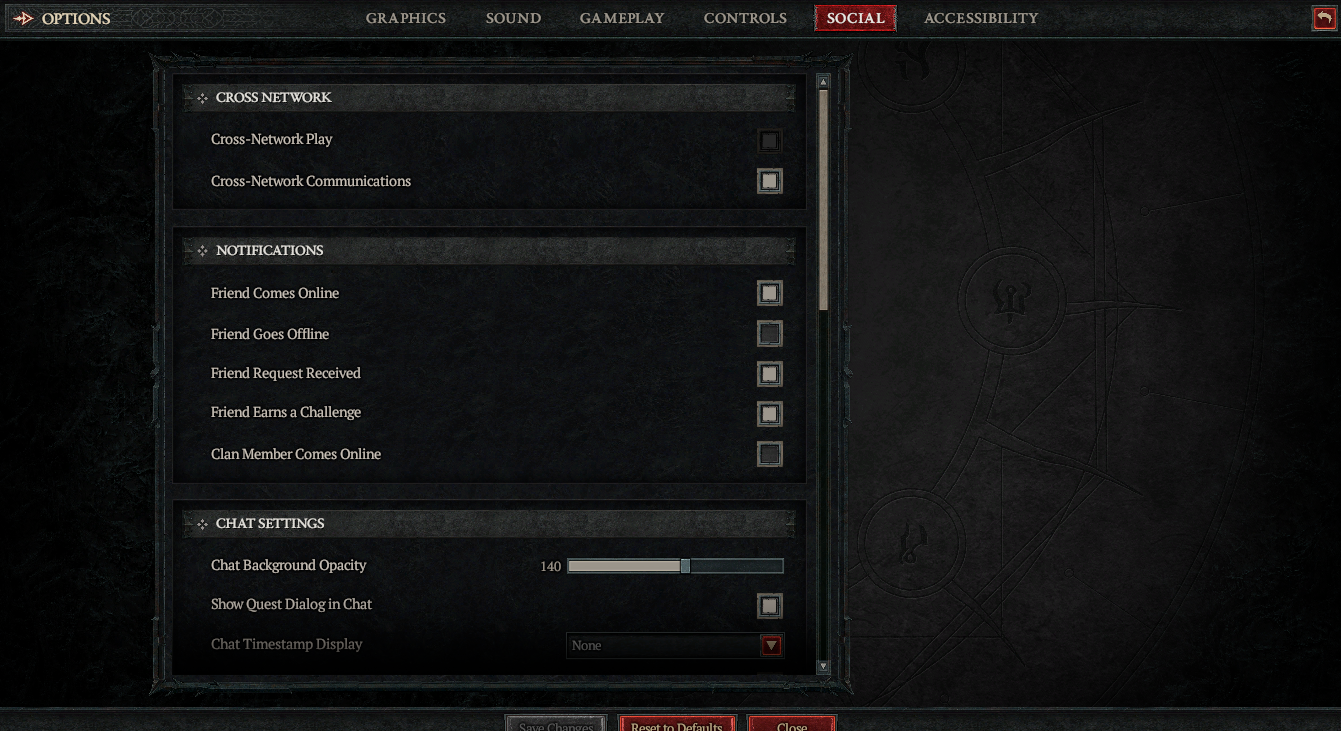
- Esc > Options > Social.
- Toggle Cross-Network Play & Cross-Network Communication ON (default).
3. Add Cross-Platform Friends
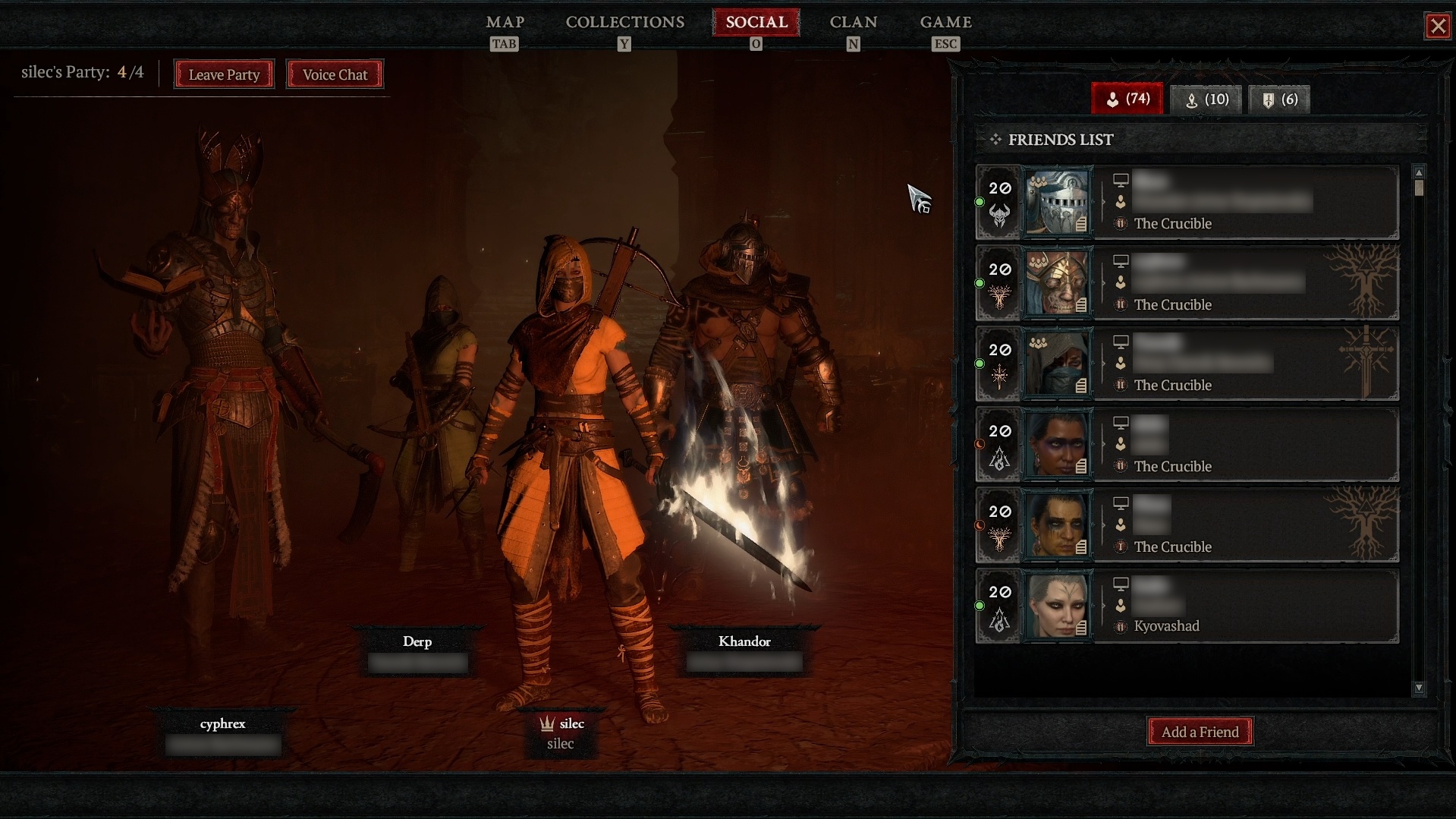
- Social tab > Friends > Add Friend.
- Enter friend’s BattleTag (e.g., PlayerName#1234)—unique across platforms.
- Invite to party: Right-click friend > Invite to Party.
Parties auto-scale difficulty. Match World Tiers for seamless joins.
Couch Co-Op & Multiplayer Tips
- Couch Co-Op: Consoles only (2-player split-screen). Unlocks after prologue (~15 mins). Each needs Battle.net login.
- Open World: Drop-in/drop-out; up to 4 players.
- PvP/Fields of Hatred: Crossplay enabled.
Diablo 4 Crossplay Limitations & Troubleshooting
Mostly flawless, but notes:
- No Cross-Buy: Separate purchases per platform/expansions.
- Local Co-Op: Console-exclusive; PC single-instance only.
- Issues?
Problem Fix Can’t join party Match World Tiers; check crossplay toggles. Progress not syncing Re-link Battle.net; restart. High ping Use wired connection; Blizzard servers unified.
Rare bugs fixed in patches (e.g., 1.2.0a).
FAQ: Diablo 4 Cross Platform Questions
- Is Diablo 4 crossplay PC and PS5? Yes!
- Diablo 4 cross save Steam to Xbox? Yes, via Battle.net link.
- Crossplay with Lord of Hatred? Fully supported.
- Disable crossplay? Toggle in Social menu.
Conclusion: Jump In Cross-Platform Today
Diablo 4’s crossplay and cross-progression make it effortless to play anywhere, anytime—perfect for 2026’s Lord of Hatred. Link your accounts, enable settings, and rally your squad. Ready to conquer Sanctuary? Download now on your platform of choice.
FAQs
Is Diablo 4 fully cross platform?
Yes, Diablo 4 supports full cross-platform play. Players on PC, Xbox, and PlayStation can play together in the same multiplayer sessions without restrictions.
Does Diablo 4 support cross-progression?
Yes, Diablo 4 includes cross-progression. Your character progress, gear, and achievements carry over across platforms as long as your accounts are linked to the same Battle.net account.
How do you enable crossplay in Diablo 4?
Crossplay is enabled by default in Diablo 4. You can manage it in the game settings menu under the social or gameplay options if you want to toggle it on or off.
Can Xbox and PlayStation players play together in Diablo 4?
Yes, Xbox and PlayStation players can join the same servers and parties in Diablo 4 thanks to full cross-platform multiplayer support.
Do you need a subscription to use crossplay in Diablo 4?
Console players typically need an active online subscription (such as Xbox Game Pass Core or PlayStation Plus) to access multiplayer features, including crossplay. PC players do not need a console subscription.
